
the largest and best domain name registrar is Godaddy. Almost every other domain is registered by it. So, here we will discuss how to register a domain name at Godaddy for the cheapest price. They usually sell a .com domain for $12.99(USD) but you can actually get , a .com or .co for as low as $0.99.- $2.99 USD).
First, check to see if the domain name you want is available. If available, register the domain name for a period of time you specify during the checkout process.
Checking a Domain Name's Availability
1 First Register on Godaddy Website
CLICK HERE TO VISIT GODADDY WEBSITE.
2 In the Domain Name Search field, enter the domain name you want to register, and then select the domain name extension from the list.
3 Click GO.

How to register a domain for the cheapest price?

visit the link below to get free valid coupon code
Godaddy Free cheap domain Coupon code Linkcopy the coupon code you pick,
Note- If the domain name you requested is already registered, they provide available alternatives. For example, you might be able to select a .info or .co domain extension, rather than .com. Or you could register
www.example.info instead of
www.example.com.
Now, when you have chosen your domain name. Click "Continue to Cart."
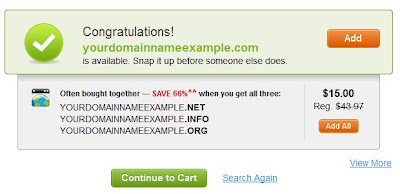
Please note that till here you will see their normal price, not the one with the discount applied, as I told you earlier that the discount will be applied on the cart.
On the next page, you will see something like the picture below.and also apply coupon, Yes, now apply the coupon code you got from the coupon page, price will then change automatically if the coupon is valid..

Click on "checkout".
Now, you will just need to enter your user and payment details and you will have your domain name registered for the cheapest price.


